
| Download the PDF User Guide | ||
|
|
||
Occasionally, you may import a duplicate image. If that image is already in your archive, Historian alerts you as you're importing in two ways.
You may see the Duplicates Warning indicator in your import dialog box:

You will also see the Possible Duplicate Detected dialog box:
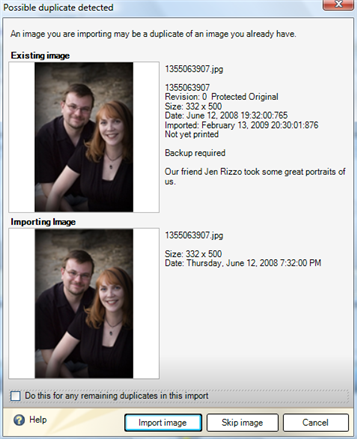
| Options | Explanation |
|---|---|
| Do this for any remaining duplicates in this import | Click this checkbox to apply your setting to all of the images in this import. For example, if you click the checkbox then click Skip image, all duplicate images will be skipped (and therefore not imported). |
| Import Image | Import the image despite the duplicate. The image will be imported as a separate image and will not overwrite the pre-existing image. You will have two identical images in your vault. |
| Skip Image | Skip the image because an identical image already exists in the media vault. The duplicate will not be imported. |
| © 2005-2013 Panstoria, Inc. |
|